
The feature empowers you to exercise precise control over which metadata will be displayed. It allows you to effortlessly add custom field values and custom classifications, ensuring a tailored and efficient management of your meta information.
How to Configure Meta Information for blocks in Elementor?
- Navigate to Pages > All Pages.
- Select a page you would like to edit or add a new page, and click on the “Edit with Elementor” link.
- The website will redirect to another URL and the panel will appear on the page. Then click the block you would like to edit.
- Select the “Style” tab, then find “Entry Meta”

- In the “Entry Meta” section, you will find the option for “Entry Meta Tags“.
- Input custom entry meta tags to show, separate by comma. e.g. avatar,author,update. Keys include: [avatar, author, date, category, tag, view, comment, update, read, like, bookmark, custom].
- For example, if you enter these meta keys: “Writen by {author}, update” please refer to the screenshot below for the results.
 Taxonomy & Custom Field Meta: You can input “Taxonomy name/slug” or custom field ID (meta boxes) if you want to display custom taxonomy or custom field value.
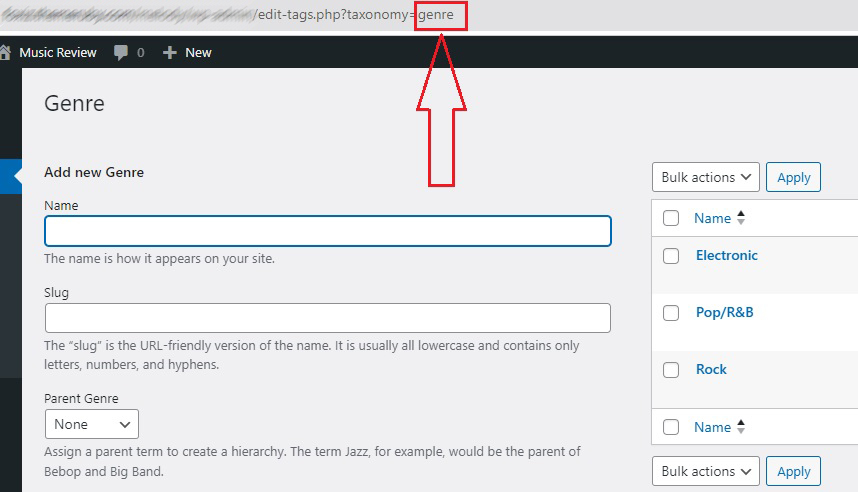
Prefix & Suffix: You can add your prefix or suffix to a meta via the format: prefix {meta_key} suffix. Example: author, Categories: {category}, view
How to Configure Meta Information in Single Post?
- Navigate to Your Dashboard > Theme Options > Single Post > Entry Meta.
- Find the “Entry Meta Tags” option and “or Custom Key Input” option.

- In the “Entry Meta Tags” option, click on this field and select your meta information.
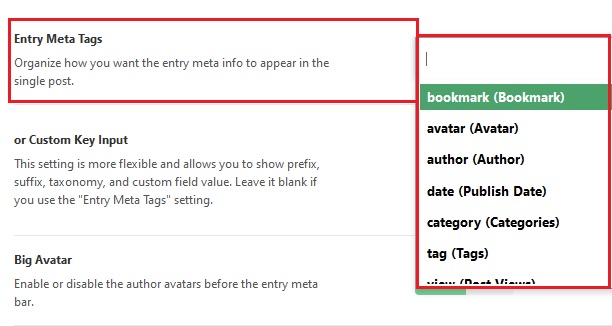
- or Custom Key Input: This setting is more flexible and allows you to show prefix, suffix, taxonomy, and custom field value. Leave it blank if you use the “Entry Meta Tags” setting.
- For example, if you enter these meta keys: “Written by: {author}, update” please refer to the screenshot below for the results.


Taxonomy & Custom Field Meta: You can input “Taxonomy name/slug” or custom field ID (meta boxes) if you want to display custom taxonomy or custom field value.
Prefix & Suffix: You can add your prefix or suffix to a meta via the format: prefix {meta_key} suffix. Example: author, Categories: {category}, view - Click on the “Save Changes”.
