
The Local Fonts Uploader plugin enables you to easily upload and use custom fonts on your WordPress site. This feature is especially beneficial for customizing the typography of your WordPress site, including the Foxiz theme, to better reflect your brand’s identity or preferred design style.
This documentation will guide you through the process of using the Local Fonts Uploader plugin, helping you upload and integrate custom fonts effortlessly into your WordPress site.
Apply the Custom Font to the Foxiz Theme
Once you’ve uploaded your custom fonts and any necessary font variants, follow these steps to apply them to the Foxiz theme:
- Navigate to the Theme Options:
– Go to Appearance > Theme Options in your WordPress dashboard.
– Select Typography. - Select the Element to Apply the Custom Font:
– Choose the element where you want to apply the custom font.
– Look for the Typography Settings and locate the Font Family option. - Apply the Custom Font:
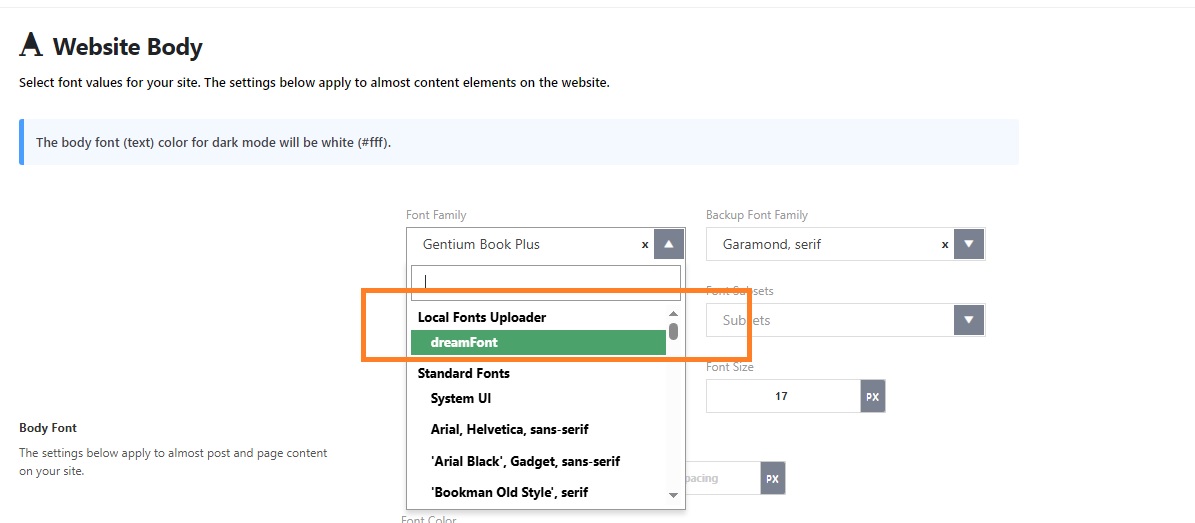
– A new Local Fonts Uploader section will appear, listing all the fonts you’ve uploaded.
– Select the font you wish to use from the list, and it will be applied to the chosen element.
That’s it! Your custom fonts should now be applied to the selected elements in the Foxiz theme.
