
Foxiz supports audio post format. It’s perfect if you have an audio and you want to replace the featured image and show it at the top of your post.
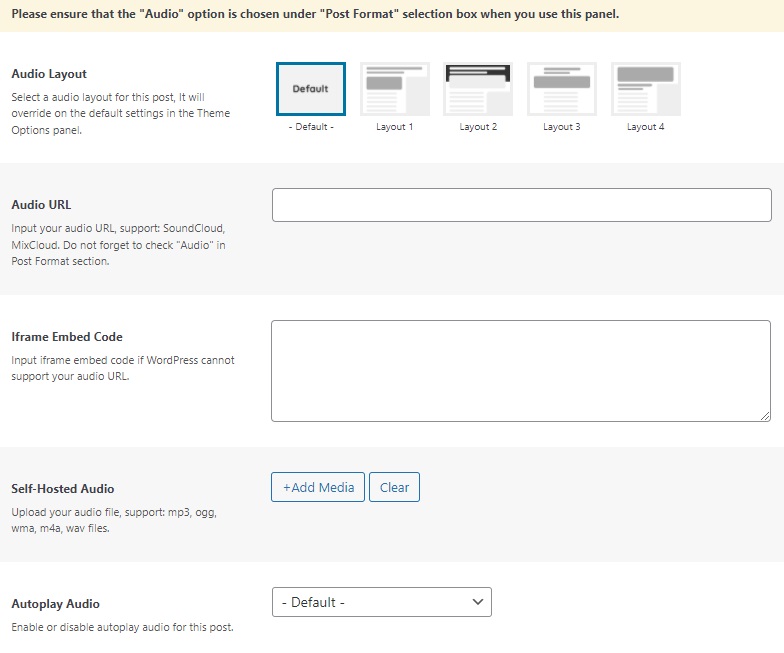
Available video hosted the theme is supported:
- Soundcloud
- Mixcloud
- iframe embed
- Self-hosted audio
- Other hosts are supported by WordPress core.
To create an audio post, follow the steps below:
- Navigate to Post > Add New
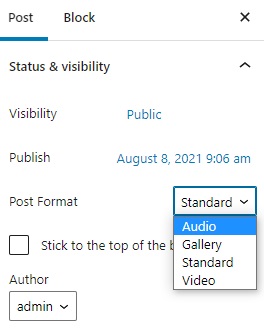
- Select “Audio” at the format box (the right of the screen).
- Upload a featured image for this post.
- Scroll down the page to find “Post Options”, then select the “Audio Format” tab.
- Input the video URL or you can upload your audio.
- Update/Save/Publish button to save the changes.
