As of June 29th, 2020, the Instagram platform will be deprecating its API. We cannot create a token via 3rd application anymore.
In order to display your Instagram photos on your website, you are required to provide an Instagram Access Token. Creating a token will only work for your owned Instagram accounts. (i.e. accounts for which you know the login credentials).
you can refer to the video below:
What should I do when the access token stop working?
For some reason (Most likely due to expiration) Your access token is stopped working. You just need to re-create a new token and input into your Instagram widget.
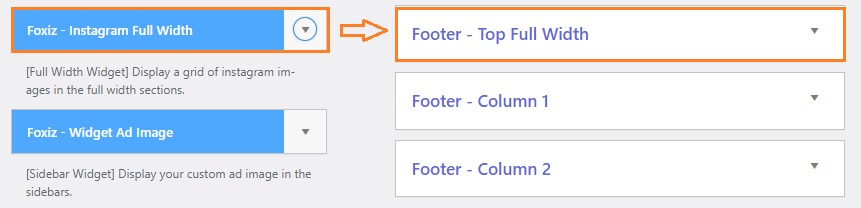
Add an Instagram grid to the top footer.
To get started, follow the steps below:
- Navigate to Appearance > Widgets
- Drag and drop Foxiz – Instagram Full Width to the Footer – Top Full Width Section at the right screen.
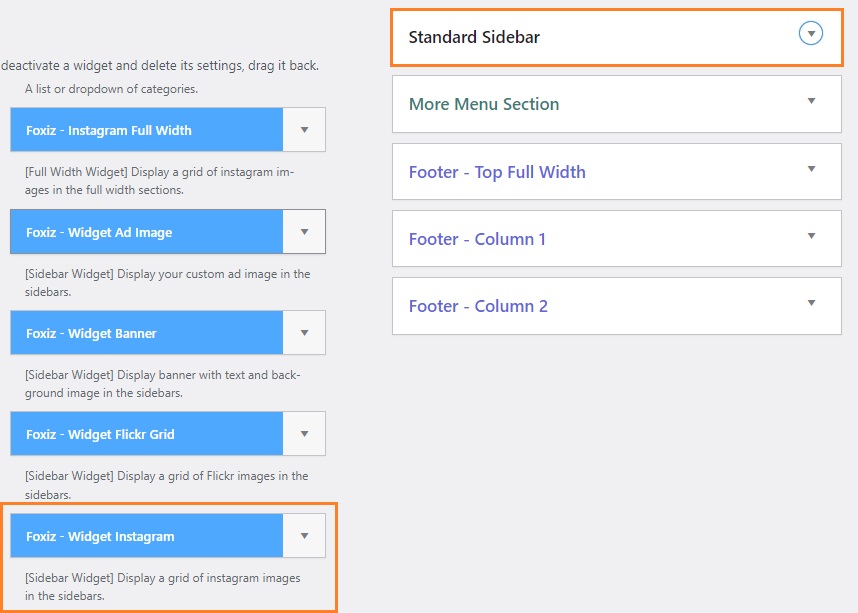
Adding an Instagram grid to a sidebar.
To get started, follow the steps below:
- Navigate to Appearance > Widgets
- Drag and drop Foxiz – Widget Instagram to the Standard Sidebar Section you would like on the right screen.