
What is Elementor?
The theme is most compatible With Elementor, this is the best builder for WordPress with more than 5 million active users. Foxiz supports all layout for this plugin.
To use Elementor, You need to install and activate the plugin: https://wordpress.org/plugins/elementor/
Creating a Page with Elementor.
To create a page or post with this plugin, follow steps below:
- Navigate to Page > Add New
- Add the title of the page, ie: Home
- Click on the “Edit with Elementor” button to switch to the builder panel.
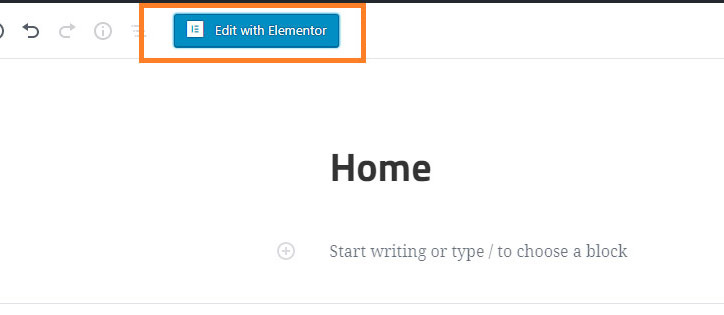
- The website will redirect to another URL and the panel will appear on the page.
Important Steps: setting up the page exactly as the below:
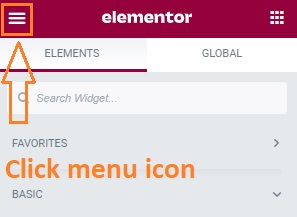
- Then click on the “Menu” icon at the left top of the left panel.
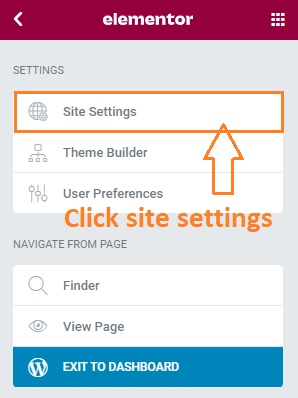
- Select the “Site Settings” option.
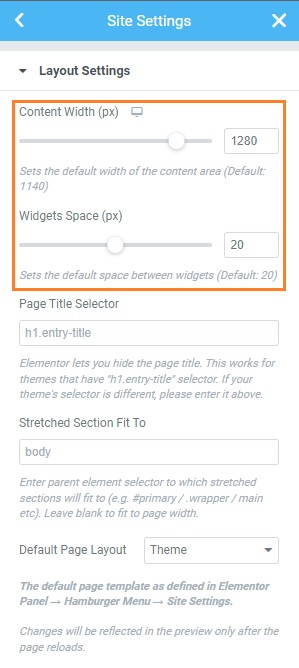
- Select the “Layout” option.
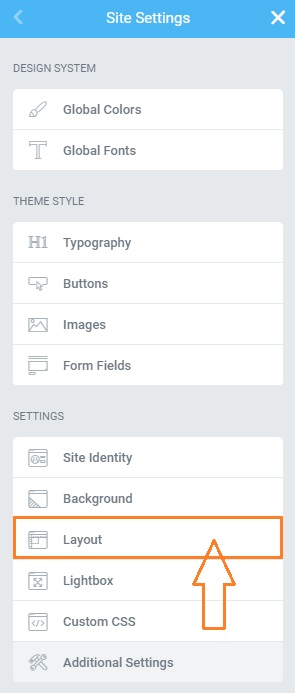
- Under the “Content Width” input this value 1280 and the “Widgets Space” input this value 20
- Click “Update” to save your changes.
- After then, You can search and build any layout. Refer to the plugin documentation for further information.
Plugin Youtube Chanel: https://www.youtube.com/channel/UCt9kG_EDX8zwGSC1-ycJJVA/videos
